
What if I already have version 2.71?
Great news! If you’re already using version 2.71, you’re on the latest version.
Please ensure that you have an active annual software maintenance subscription to enable uninterrupted access to Databuild for users within your business.
Does the update cost anything?
There is no cost if you have an active annual software maintenance subscription.
How can I check what version our business is using?
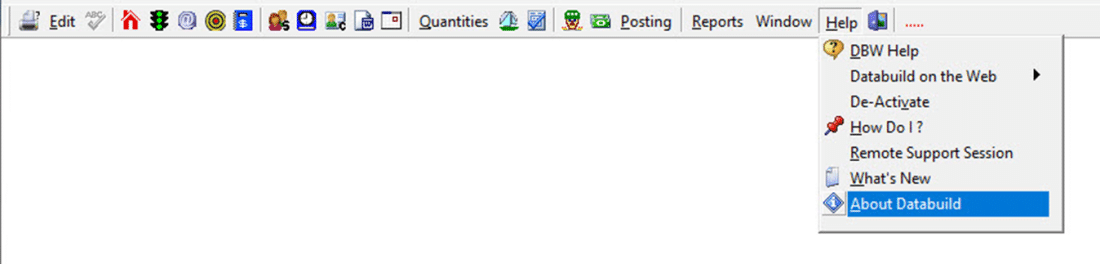
For version eligibility, please ensure that you have an active annual software maintenance subscription. You can confirm this within your Databuild software by navigating to the Help menu and selecting ‘About Databuild’:
Email accounts@databuild.com.au if you require assistance to renew your annual software maintenance subscription, as you will be impacted by this change if any of your team are using Databuild versions prior to 2.71.
What should I do if my software version is older than 2.71?
- Contact Software Support to book a convenient time for the update.
- Include your IT provider and let them know about the scheduled update.
Benefits of the upgrade:
- Reliability: Improved stability and security.
- Performance: Faster data processing.
- Scalability: Supports more users and larger data sets.
- Future-Readiness: Sets the foundation for upcoming technological advancements.
How long will the update take?
The update usually takes between 30 minutes and 3 hours, depending on the number and format of your databases.
Will there be any downtime?
Yes, there will be some downtime. However, we’ll take preparatory steps to ensure that this downtime is minimised.
Do I need my IT involved?
Yes, we strongly recommend involving your IT team. They’ll need to back up your data before and after the update.
Who will perform the update?
Our software support team will handle the update with assistance from your IT provider.
What if something goes wrong?
We’ll restore your backups and revert to the previous version, then reschedule the update.
What if I don’t update?
If your business is running a Databuild software version earlier than 2.71, new user licence activations will fail, and existing user licences may also stop functioning.
This will restrict access to the software as the version will be outdated and unsupported.
Is the update performed on-site?
No, we’ll do the update remotely via TeamViewer.
Subscribe to SmarterBuild
To stay updated with the latest developments, subscribe to our Smarter Build newsletter.
If you have any more questions, feel free to reach out to our software support team here.